My Phone Screen
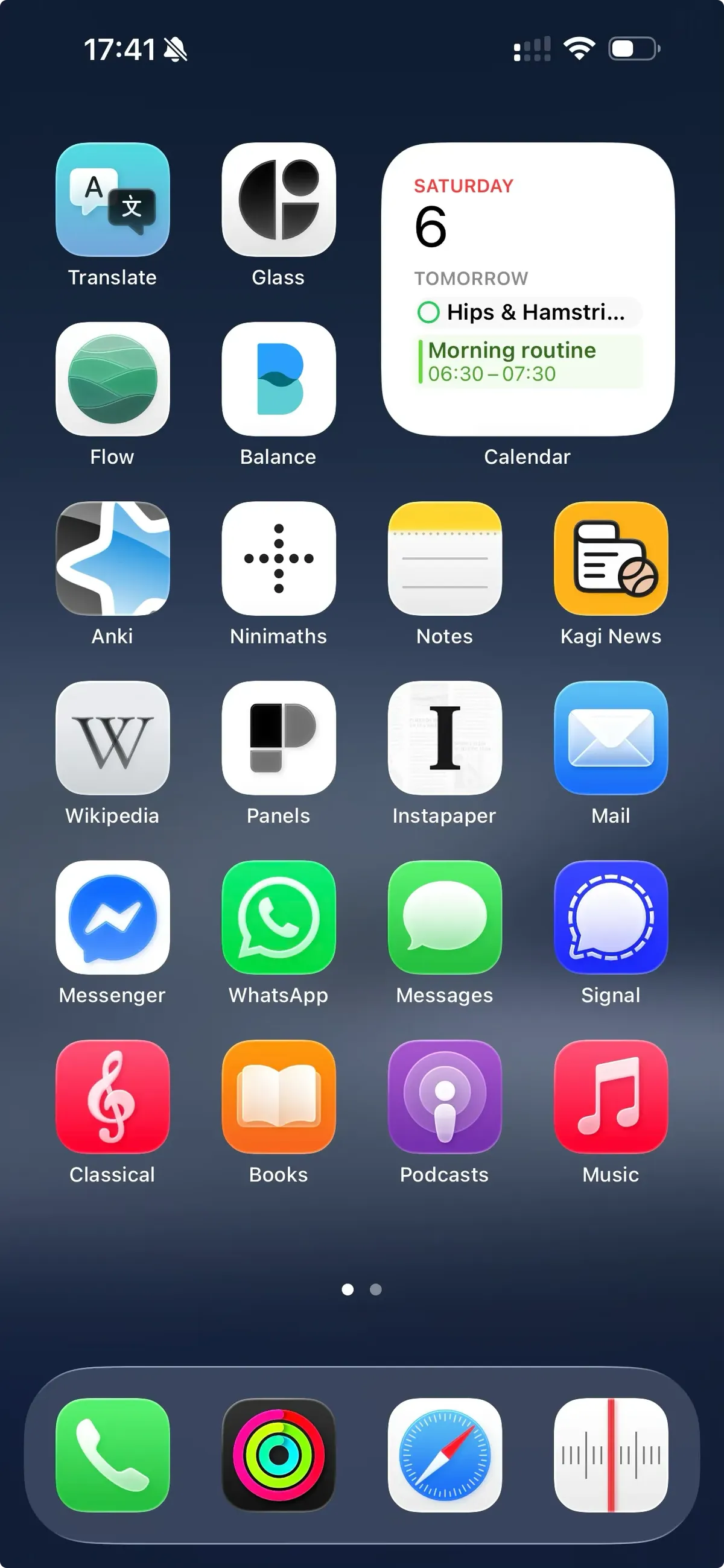
Over the years I’ve spent a lot of time using my phone, as is true for most of us. A few years back I started thinking more about how I use it. There’s no getting away from it, smart phones are pretty much indispensable in this day and age, needed for internet banking to bus tickets and all the other things in between. I make and reschedule medical appointments easily, and most important for me, my calendar. I give English lessons along side my full time job, my wife gives Polish lessons alongside her’s, so it’s essential we plan it out in a joint calendar for us both to keep track of day to day life. I wouldn’t want to be without my iPhone. I’m in the eco system, I enjoy using it, and the convenience is like nothing else. I want to go through my Home Screen and give a run down of each app, why I use it, and how it benefits me day to day.
Translate
There’s no other option when living in a foreign country, translate is essential. There’s always a word or phrase I don’t know in Polish so I’m often searching up words, deepening my understanding of Polish language.
Glass
While not an essential app, it’s the best photography community out there, the design is impeccable also. There’s none of the business we’ve come to see from social media, it’s not ancient and badly maintained like Flickr, and it doesn’t push optional payments in frustrating places like 500px. If you want to use glass, you need to pay, that’s it. What it gives back in return is a clean ui, uniform across all devices (including web), and full focus on the photography.
Flow
Hands down the best pomodoro app out there for me, perfectly designed for iOS with an exceptional support team. The pomodoro technique has helped me slow down and break my work into smaller steps, taking more breaks. There are many pomodoro apps out there, but for me this one has it all. They also have a really friendly and responsive support team, I highly recommend.
Balance
The most underrated meditation app out there. 1 of 3 apps offered by the mind company, with a choice of male or female voices and meditations that change slightly each time you listen to them. They have a great selection of plans, bed time meditations, and single sessions working through a range of emotions. My favorites are the bed time stories, very nice and calming, allowing me to wind down gently.
Anki
I know this is a staple for many, so not much to say here. Open source flashcard champion offering the simple solution with no strings attached. One improvement would be nice if they could sort out the lack of notifications on iOS, but nothing is perfect, right?
Ninimaths
This one I discovered a few days back and so far I’m really enjoying it. Offering math sessions to train all types of mathematics in quick concise lessons with no fluff. I think this one will stay with me because maths is a real weak point for me, and I want to be better at it. I used Kahn Academy before, though I don’t find the iOS app all that intuitive.
Apple Notes
I love this app, and while it could do with a few more features, it is free. It’s also bug free which cannot be said for its competitors such as GoodNotes and Notability. I’ve tried so many apps over the years for notes, it’s a really important app on my phone and I’ve tried exclusively using apple notes a few times, but I always find myself looking for something more. Now I’m here to stay because it just works.
Kagi News
I have a problem with the news. If I have a news subscription, I’m completely taken in by the fake social media style stream that these legacy organisations now have on their apps. It’s too addictive to me, even though I know they are just chopping up recent posts and calling it new news, saying it happened 2 minutes ago. Kagi News is the best alternative for me. It’s not perfect, by a long shot, but then it is still in beta so I’m not going to complain. It has real potential to redefine the way we consume use. It uses AI to create detailed summaries of the news stories from the previous 24hrs. The best part? It only updates once a day, not at all addictive for me, though it is frustrating when it simply doesn’t update until about 11PM at night (should update at 13:00 CET). I’m going to stick with it though because it gives me what I want without being addictive, this is no.1 on the importance scale for me.
Wikipedia
I love what they’ve done with the Wikipedia app, same old Wiki but finally with a decent UI.
Panels
Next up for Manga and Graphic novels. Panels is an app that really cares about a seamless experience, no advertising and super fast. You open it up and your reading in full screen with no distractions, it took me a while to find something this clean, so for sure I will stick with it.
Instapaper
This is the only read it later app I can use. I first started with Instapaper, then searched a whole list of other read it later’s to find something better, and I just couldn’t get the same experience. It feels like a native app. It’s a joy to read on, and now has AI voices in the paid version so I can listen to articles in audio for, without feeling like a robot is destroying my ears.
Apple Mail
Similar to Notes, it’s free, you can add multiple accounts, uniform design and usage across products, no other option in my opinion.
Messaging
I don’t like having four different apps, but that’s the world we live in. By far WhatsApp is the mos used, because that’s where most of my contacts are. Messenger comes in a distant second, due to the fact it was one of the first and some people prefer to use it. Messages for iMessage and SMS’s when contacting people from my UK number. Last but not least, signal, the one I wish would get more traction amongst my friends and people in general. A handful use it, but generally when we already use something, we don’t tend to change it. I wish I could cut it down and if I had a choice I’d get rid of messenger because I hate Meta and everything it produces.
Music
I use Apple Music, and Apple Classical. I love all kinds of music from metal, to jazz, rap, blues etc. but since Apple Classical came out, I’ve been exploring much more classical music. The apps are clean with no ads. They are reminiscent of the old days of loading MP3’s onto phones and MP3 players. I tried Spotify, it’s just not for me, far too busy for my liking.
Apple Podcasts
I like this app, it’s free. I’ve also tried others but I keep coming back for convenience and ease of use.
Apple Books
A really underrated app which doesn’t see enough attention from Apple. I use it for e-books PDF’s and learning materials. I’m also a big fan of audiobooks, and although Apple Audiobooks are not available in Poland, I can still buy them from Audible, download them and manually add them from iCloud to my Mac, then add them to my phone and the progress updates across devices. It’s clunky, but a clean seamless experience when all is said and done. This eliminates the need for the cumbersome audible app, and the ridiculous Kindle app (ridiculous since Amazon decided to lock in all their eBooks, sure it won’t be long for Audible too). Apple Books combines it all and stays within the eco system.
Tab Bar
Phone, for phoning people and blocking spam calls, apple fitness to keep up with my goals (I don’t agree with the whole ring thing, much prefer Gentler Streaks approach). Safari with Kagi search works great for privacy, and it’s fast. Last but not least, RadioApp. I love this app, it’s made in the style of an old analog radio with the tuning bars, complete with tuning sounds as you switch between stations. Once again, clean concise and just radio.
It took me a long time to come to this design, and usage model. I reject social media in all forms apart from a little reddit (Artemis is a fantastic replacement since Apollo’s death). I’ve built my habits around analog style apps that don’t have a feed constantly updating to keep me checking something. I like to foster learning, when I’m on the tram or have free time. The devices I own should work for me, not the other way around. This way I feel I’m being true to life. Sticking to the tried and tested ways of consuming information in a calm way, where I have to work for it. The result, I pick up my phone much less.
This is far from all the apps I use, but these are the main ones that fit my day to day needs most. I love technology, but the most popular solutions don’t work for me. I can’t do the addictive apps that keep me scrolling, because that’s simply all I will do! This way, I own and control my device, not the other way around.
I will likely update this in a future post as I’m always changing things around, because for me its kind of fun.
Let me know if any of you guys are as crazy as I am, and put far too much time into unnecessary long term projects, hit the email button bellow to get in touch.